If you have problems running the ODEON license from the dongle, please use the following checklist to locate the problem. If it does not help, please send an e-mail to support@odeon.dk.
Case 1: Edition and versions
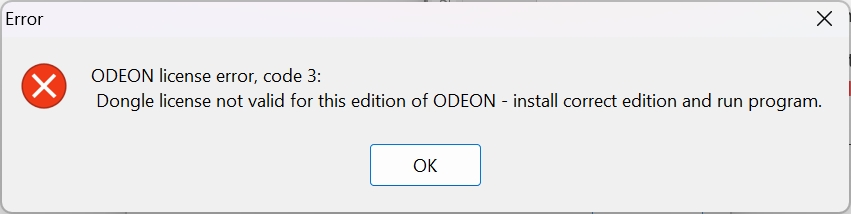
If you get the following error message, you have installed the wrong version or edition of ODEON:
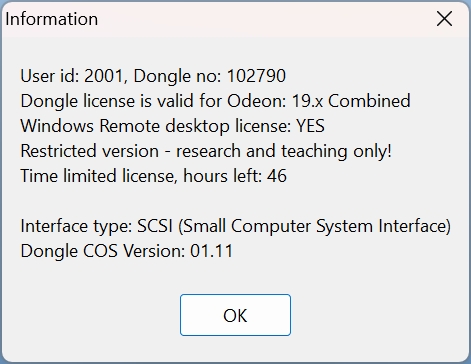
To check the version and edition of your dongle, go to “Tools>License Information”.
- The version (number e.g. 18.xx) of the dongle needs to be the same or higher than the installed version.
- The edition (basics, industrial, auditorium or combined) needs to match the installed edition.
You can download the correct version or edition for your dongle from our website.
Case 2: Timestamps
If you get the following error message, you have used all your timestamps.
Some dongles have a time limit. Open “Tools>License Information”. If it says “hours left: xx” there is a time limit. If the hours left is “0”, the timer must be updated. Contact support@odeon.dk or sales@odeon.dk.
Case 3: Dongle not found
If you get the following error message, ODEON cannot find any dongle.

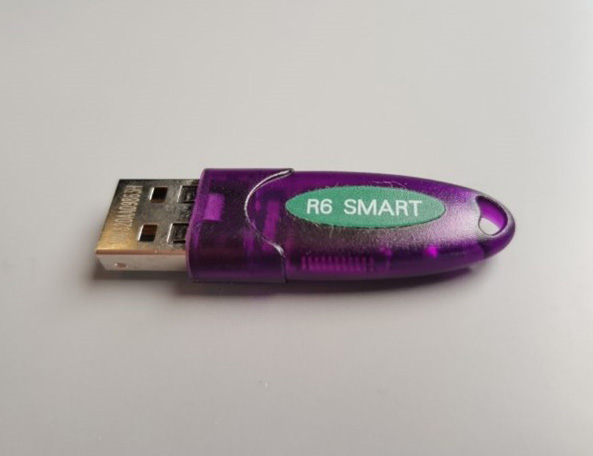
- Please make sure you are using the correct license USB-stick. It is purple and says “R6 Smart”. The silver USB dongle, that is often included in the package, contains only installers and other data files.
The small green light on the USB-stick should be on. Otherwise, try another USB-socket. In rare cases, it can help to move the USB stick to a port closer to the power input, i.e. the USB ports at the back of a desktop PC.
- If using a Windows PC, you can check if the process is running in the Task Manager.
- Open the Task Manager.
- Open the “Services” tab.
- Check if “ROCKEY6S_SPSVC” is there.
- Check if the status is “running”. If it is “stopped”, right-click on it and choose “Start”.
- Re-install the dongle. In ODEON, click on “Tools>Reinstall dongle service”. Alternatively, you can find the installer file in “Windows(C)>Program Files(x86)>Odeon[Version+Edition]”. The installer is called “InstallDic32Svc”.
- Make sure that the dongle software ROCKEY6S_SPSVC is not in quarantine in your antivirus program settings.
- If none of the above works, please contact support@odeon.dk.