Materials
Global Material Library
When ODEON is installed for a first time in your PC it stores the default database of materials in a file called Material.Li8 inside the Materials subfolder. The usual path of the Materials subfolder and the rest subfolders used by ODEON can be seen in the figure below:
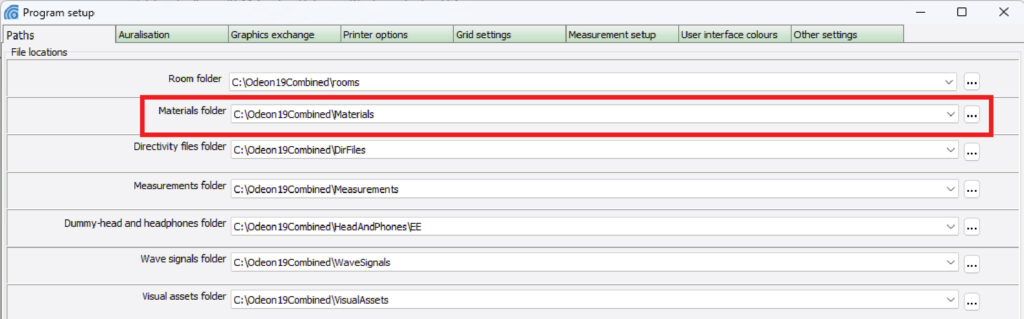
You can see the paths window by choosing Options>Program setup. If you want to restore the ODEON’s default material library (probably because you accidentally deleted a material) you can download the Material.Li8 file from here and paste/replace it at the Materials subfolder in the path highlighted above.
Material Template
In the extensive material library in ODEON, every 1000 numbers are grouped together as a category, as seen below. In each category the first 100 materials should be reference materials. We have suggested a few to begin with. Hereafter there will be room for 9 different manufactures lists (e.g. with number 1100-1199). You decide which manufacturer (e.g. from below list of links) should have what numbers when inserting the material list in ODEON.
Instructions on how to use the template (also available as a tutorial video)
Materials from Manufacturers
For each manufacturer, you can download a spreadsheet (in Excel or Google Sheets) format, visit their official website, and see recommendations for which categories to place their materials in within your ODEON material library.
Categories:
Categories:
Categories:
Categories:
Categories:
Categories:
Categories:
Categories:
Categories:
Categories:
Categories:
Categories:
Categories: