Select the unity HRTF (Head Related Transfer Function) in the auralisation setup – delete the text contents in the Headphone input box. The box turns red but you can ignore this warning in this case. This will produce a BRIR (Binaural Room Impulse Response) where both channels are equal, without any compensation for headphone reproduction. You can afterwards use an audio editing software to keep only one channel.
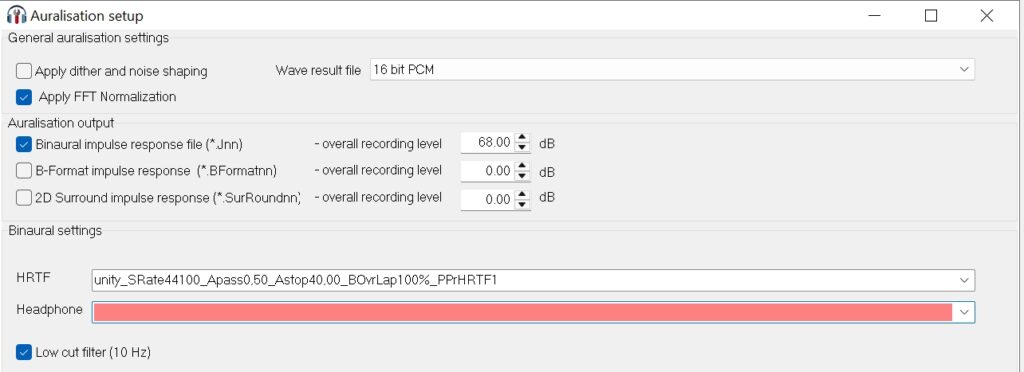
Alternatively, you can also produce ambisonics impulse responses, by checking “B-format impulse response” in the auralisation setup. The first channel of the impulse response (order 0) will correspond to the pressure impulse response at the receiver.

It seems there are no related FAQs.
Feel free to contact us for any question you may have! We will do our best to answer as soon as possible!
We can even set up a Skype demonstration before a potential purchase.
Please enter your e-mail address below and a download link will be sent to you.
Please notice that you are contacting Odeon Room Acoustic Software company, which is not related to any other businesses that use the same name (Odeon cinemas, Odeon in Odense etc.).
Unfortunately we receive a lot of false inquiries lately. These will be deleted immediately in our account. Thank you for your understanding.
Please enter your e-mail address below and a download link will be sent to you.
Please share your location to continue.
Check our help guide for more info.